Information referenced from Microsoft Documentation article: Change Default Programs in Windows.
A default app is a program installed on Windows 10 that opens certain file types or completes specific tasks.
Sometimes Windows can reset default apps when applying updates or when other applications are out of date.
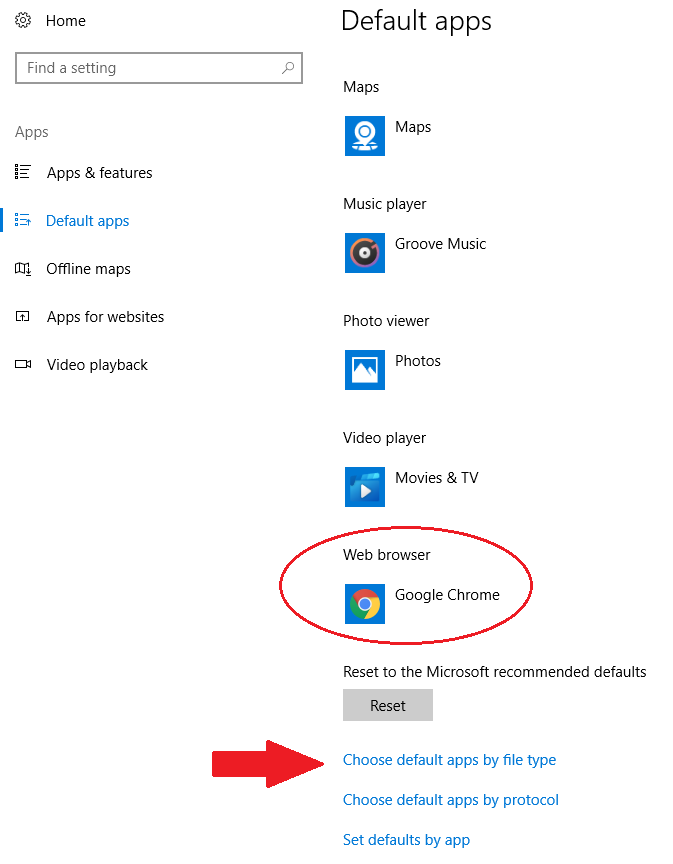
To update or view Windows default programs:
- On the Start menu, select Settings > Apps > Default apps.
- Select which default you want to set, and then choose the app. Apps need to be installed before you can set them as the default.
- Select Choose default apps by file type if you want to make specific file types open with a dedicated application (for example, .pdf can be set to open in Adobe Acrobat Pro, or .jpg can be set to open in Photoshop). To temporarily open a file with another application, right-click on the saved file, select Open with, and choose your application.